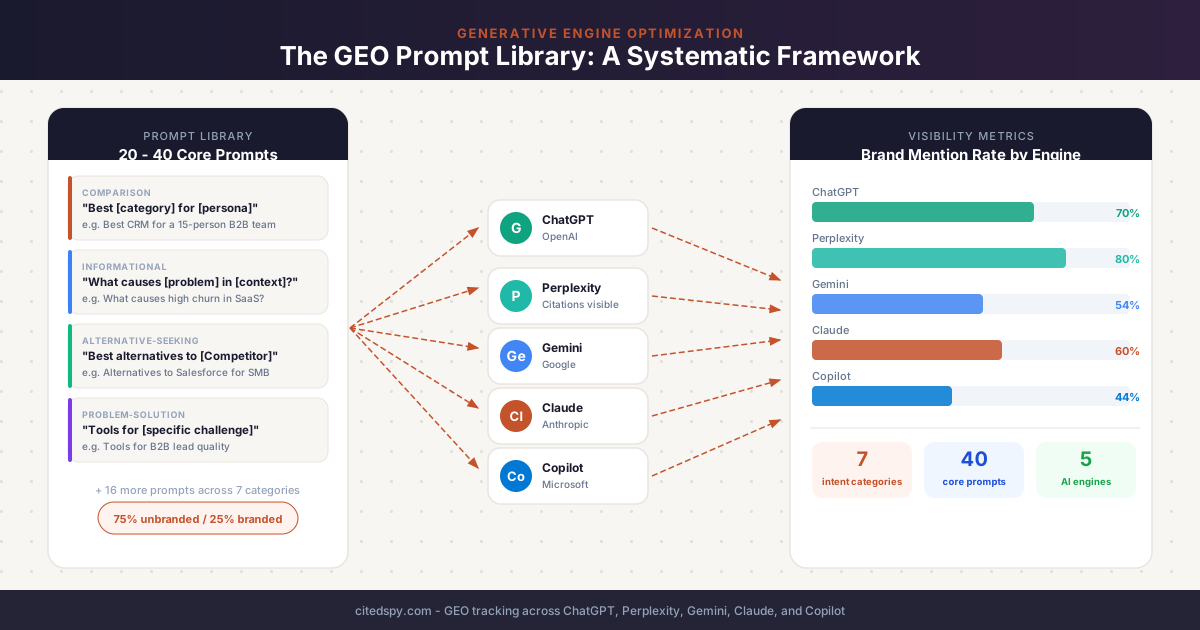
Most brands doing GEO today have the same problem: they have a handful of prompts they occasionally paste into ChatGPT, they see their brand name appear, and they call it a win. That is not GEO measurement. That is confirmation bias dressed up as a strategy.
A real GEO prompt library is a structured, intent-mapped set of queries that mirrors how real buyers use AI engines at every stage of the purchase journey. Without it, you cannot track share of voice, identify citation gaps, or know whether your content changes are actually moving the needle. The prompt library is the foundation. Everything else - content optimization, competitive tracking, citation analysis - is built on top of it.
This guide covers exactly how to build one from scratch: the categories that matter, how to organize and size your library, what separates a good GEO prompt from a useless one, and templates you can start using today.
What a GEO Prompt Library Is (and Why It Is Not Keyword Research)
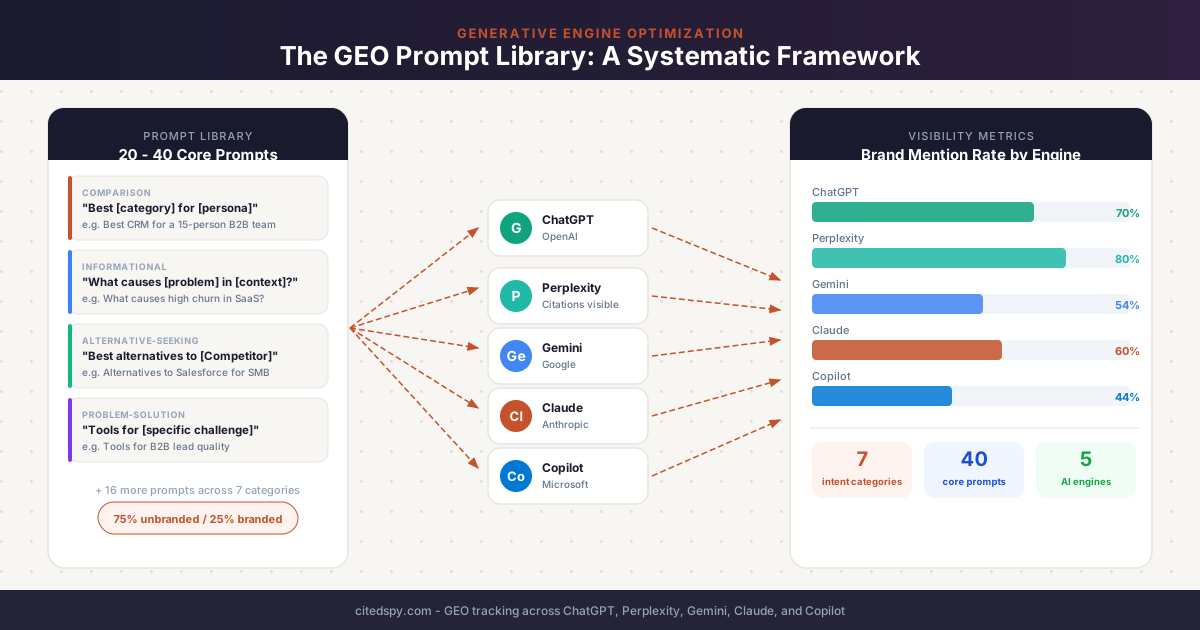
A GEO prompt library is a curated set of full-sentence, conversational queries that you run against AI engines - ChatGPT, Perplexity, Gemini, Claude, Copilot - to measure where your brand appears, in what context, and alongside which competitors.
The comparison to keyword research is worth unpacking because the two are related but structurally different.
Keywords are short fragments: "email marketing software," "best CRM 2026." Prompts are how real people actually talk to AI engines: "What is the best email marketing platform for a SaaS company with a 10,000-subscriber list and a $300 monthly budget?" That second version embeds a persona, a constraint, and an intent signal that the keyword version strips out entirely.
This matters because AI engines respond to qualifiers. The same underlying question asked with different specificity levels ("best CRM" vs. "best CRM for a 15-person B2B sales team") surfaces different brands, different citations, and different ranking logic. A prompt library forces you to be specific about what you are actually measuring.
The three signal types your library measures are:
- Brand mentions - your company name appears in the AI-generated answer
- Source citations - your URL is cited as a source, even if your brand name is not used
- Recommendations - the AI uses directive language ("use X," "X is best for Y") pointing to your brand
Each signal type tells you something different. Tracking all three requires a library with enough variety to trigger each.
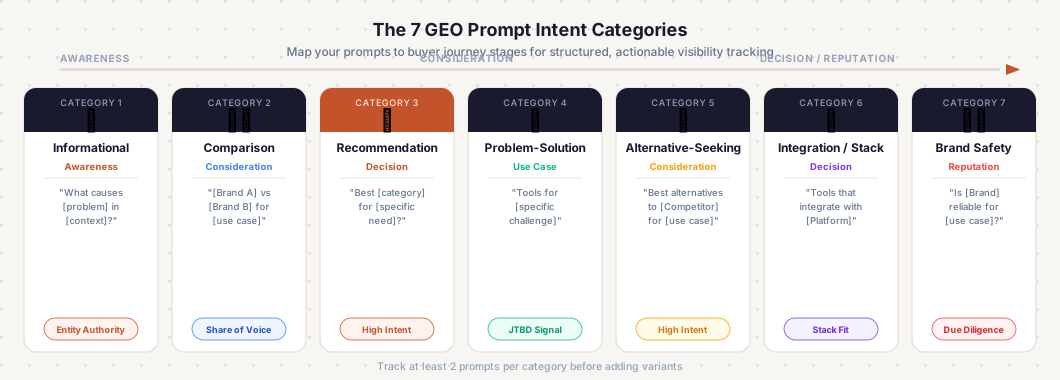
The 7 Core Prompt Categories
All credible GEO frameworks converge on the same intent categories, with minor naming variation. Here is the consolidated taxonomy with examples for each.
1. Informational (Awareness)
The user is learning about a problem or category, not yet evaluating vendors. Informational prompts are where entity authority is built - if AI engines do not associate your brand with the problem space, they will not recommend you when buyers get to the comparison stage.
Template patterns:
- "What causes [problem] in [context]?"
- "How does [category/concept] work?"
- "What are the risks of [doing X] without [solution category]?"
- "Is [solution type] worth it for [company type]?"
> Example prompts:
> "What causes high churn in SaaS?"
> "What is generative engine optimization and how does it work?"
> "Are there downsides to relying on AI for customer support?"
The expert warning that consistently appears in frameworks: most teams skip informational prompts because they feel too top-of-funnel to drive revenue. The counterargument is correct - informational invisibility is the upstream problem. If you do not appear at the awareness stage, you are already behind when comparison queries are asked.
2. Comparison (Consideration)
The user is weighing options. This is the highest-competition category and where most brands concentrate effort - correctly, because these prompts have the clearest path to conversion.
Template patterns:
- "[Brand A] vs [Brand B] for [use case]"
- "Best [category] for [persona/company size]"
- "[Category] tools compared"
- "Top [category] alternatives for [specific need]"
> Example prompts:
> "Salesforce vs HubSpot for a 20-person B2B sales team"
> "Best accounting software for freelancers"
> "Top project management tools for remote marketing teams"
> "AI citation tracking platforms compared"
According to BrightEdge's ecommerce AI analysis: "Best/Top" queries generate 4.7-6.2 brand citations per response across engines. Comparison ("vs/versus") queries generate 4.5-5.8. These formats reliably surface multiple brands per answer, making them the most diagnostic category for share-of-voice measurement.
3. Recommendation / Best-of (Decision)
The user wants the AI to make a specific pick. The AI adopts an advisor role and names a winner. This is the mid-to-late funnel category with the clearest purchase signal.
Template patterns:
- "What is the best [product] for [specific need] that [constraint]?"
- "Which [category] should I use for [use case]?"
- "What do you recommend for [problem] if [condition]?"
> Example prompts:
> "Which AI visibility platform should I use for a B2B SaaS company?"
> "What is the best email marketing platform for ecommerce under $100 per month?"
> "Which CRM integrates well with HubSpot and works for a small team?"
Budget-intent queries ("under $X," "affordable," "cheap") perform particularly well here - they tend to generate more brand mentions per response than non-budget-qualified versions of the same question.
4. Problem-Solution (Use Case / Instructional)
The user describes a specific pain point and asks what to use to address it. Distinct from recommendation prompts because the framing is problem-first, not category-first. These prompts map directly to the job-to-be-done your product was built around.
Template patterns:
- "What should I use for [specific problem]?"
- "How do I [achieve outcome] without [pain point]?"
- "Tools for [specific challenge]"
- "How to [accomplish task] using [category]"
> Example prompts:
> "What should I use for monitoring how ChatGPT talks about my brand?"
> "Tools for reducing customer support response time without adding headcount"
> "How to improve B2B lead quality without increasing ad spend"
Instructional prompts are the category where content citations are most diagnostic. If your how-to guides and documentation are not being cited, these prompts surface that gap directly.
5. Alternative-Seeking
The user knows a major competitor and is actively looking for substitutes. These queries have high commercial intent and explicitly mark a shortlisting moment.
Template patterns:
- "Best alternatives to [Competitor] for [use case]"
- "[Category] tools besides [Competitor]"
- "[Competitor] competitors for [team size/budget]"
> Example prompts:
> "Best alternatives to Salesforce for small business"
> "Project management tools besides Monday.com for creative agencies"
> "Top SEMrush alternatives for GEO and AI search tracking"
If you are not appearing when buyers look for alternatives to your category leader, you lose consideration entirely - and never even know it.
6. Integration / Stack / Ecosystem
The user is making purchase decisions based on tool compatibility. Most relevant for software products. These prompts reveal a committed buyer who already has infrastructure decisions made.
Template patterns:
- "Tools that integrate with [Platform]"
- "[Category] software that works with [tech stack]"
- "Best [category] for teams using [platform]"
> Example prompts:
> "Tools that integrate with Salesforce CRM"
> "GEO platforms that connect to Google Search Console"
> "Best AI search monitoring tools for teams using HubSpot"
7. Brand Safety / Reputation
The user is researching your brand with skepticism. These prompts reveal what AI says about you in due-diligence moments - and incorrect AI descriptions of your pricing, features, or positioning are a direct conversion killer.
Template patterns:
- "Is [Brand] legit?"
- "What do users say about [Brand]?"
- "[Brand] reviews and complaints"
- "How much does [Product] cost?"
> Example prompts:
> "Is [Your Brand] reliable for enterprise teams?"
> "What are the main complaints about [Your Brand]?"
> "[Your Brand] vs [Competitor] - which is better reviewed?"
Track these separately from commercial prompts. Mixing them into your share-of-voice metrics inflates the numbers in ways that mask real visibility gaps.
How to Organize Your Prompt Library
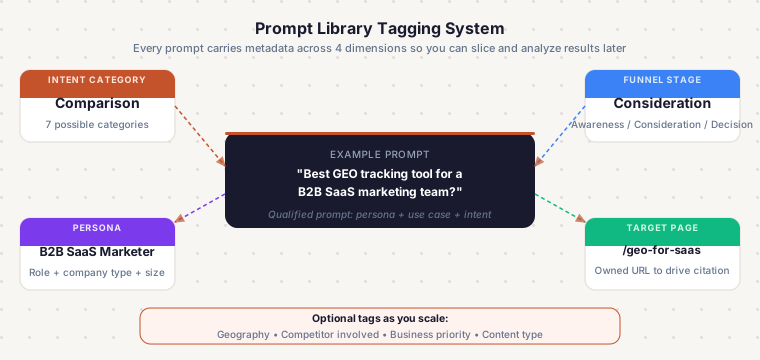
The tagging system
Every prompt in your library should carry metadata across at least four dimensions:
| Dimension | What to tag |
|---|---|
| Intent category | Informational, comparison, recommendation, problem-solution, alternative, integration, brand safety |
| Funnel stage | Awareness, consideration, decision |
| Persona | Company size, role, industry, budget constraint |
| Target page | The owned URL this prompt should ideally drive citation to |
Optional dimensions worth adding as the library matures: geography (for multi-regional tracking), competitor involved (for comparative prompts), and business priority (revenue-critical vs. awareness-only).
This metadata structure lets you slice data in ways that answer real questions: "Which persona am I least visible to?" or "Where are competitors beating me at the decision stage?" without re-running the entire library.
Branded vs. unbranded ratio
Maintain roughly 75% unbranded prompts to 25% branded. Brands already rank well for their own name in AI engines - over-indexing on branded prompts produces inflated metrics that mask the real visibility gap (the unbranded queries where buyers are actually forming preferences without you).
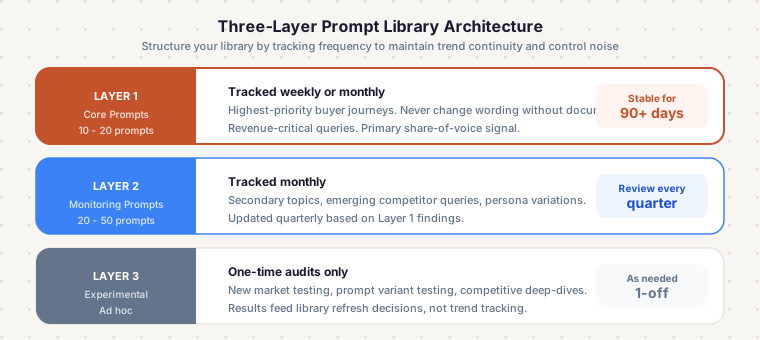
The three-layer architecture
Structure your library in layers by tracking frequency:
Layer 1 - Core prompts (10-20 prompts): Stable, consistent, tracked weekly or monthly. High-priority buyer journeys, highest revenue impact. Never change these without documenting a baseline first - rewording destroys trend continuity.
Layer 2 - Monitoring prompts (20-50 prompts): Tracked monthly. Cover secondary topics, emerging competitor queries, and persona variations. Updated quarterly based on what Layer 1 reveals.
Layer 3 - Experimental prompts (ad hoc): One-time audits, new market testing, prompt variant testing. Results do not roll into trend tracking - these feed library refresh decisions.
Starting library size by use case
| Situation | Recommended starting size |
|---|---|
| Single product, single market, early stage | 20-40 prompts |
| Multi-product or multiple personas | 60-150 prompts |
| SaaS with complex persona matrix | 100-250 prompts |
| Competitive audit or agency scale | 300-500 prompts |
| Multi-market international | 30-100 prompts per priority market (separate libraries) |
The practical answer for most teams: start with 20-40 prompts across your core buyer journeys, run them for 30 days minimum before drawing conclusions, then expand.
What Makes a Good GEO Prompt vs. a Bad One
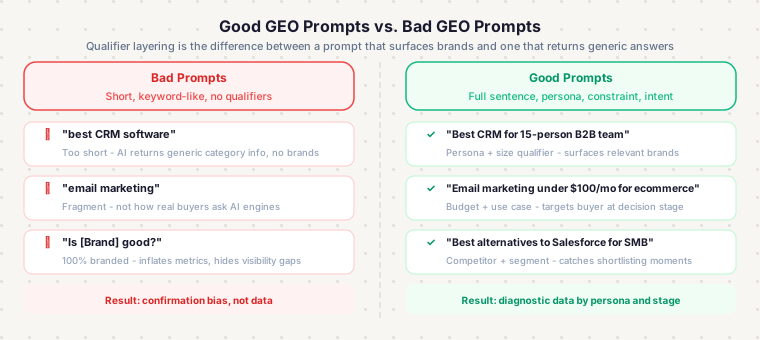
The four-question quality filter
Before adding any prompt to your library, run it through these checks:
- Competitive relevance - Would this realistically surface your brand or a direct competitor in the response? If the prompt is so generic that AI engines answer it without naming any vendors, it is not useful for tracking.
- Influenceability - Can you realistically compete with the sources currently being cited for this prompt? If the citations are all Wikipedia and major news outlets, content you create is unlikely to break through.
- Business alignment - Does this prompt connect to an actual product category or revenue driver? Tracking prompts about adjacent topics is fine for entity authority but should not crowd out your core commercial queries.
- Scope - Is the prompt specific enough to yield actionable data? "What is marketing?" is not trackable. "What is the best AI search monitoring platform for a B2B SaaS marketing team?" is.
Common mistakes in prompt design
Too short and keyword-like: "best CRM software" will not behave in an AI engine the way it behaves in a search engine. AI engines generate very different answers to short fragments than to full questions. Write full conversational sentences.
No qualifier layering: "Best project management tool" and "Best project management tool for a remote team of 15 using Google Workspace with a $50/seat budget cap" are fundamentally different prompts that surface different brands. Add qualifiers that match your real buyer personas.
All-branded, no commercial: A library of "Is [Brand] good?" prompts tells you about reputation, not about the unbranded competitive landscape where you are gaining or losing deals.
Static library: Citation patterns shift month-over-month. Only 35% of domains repeat in AI answers between runs - meaning GEO is not a set-and-forget measurement. Prompt libraries need quarterly reviews.
Where to Source Your Prompts
The best prompt libraries combine language from multiple sources, in this order of signal quality:
- Customer call transcripts and sales objection logs - the exact language buyers use before they understand your product
- Support ticket and onboarding question patterns - post-purchase job-to-be-done framing
- Review platforms (G2, Capterra, Trustpilot) - authentic peer-to-peer evaluation language
- Community forums (Reddit, Slack groups, Discord, industry communities) - unfiltered buyer-stage questions
- Search Console non-branded queries - convert long-tail queries (10+ words) into natural-language prompts directly
- People Also Ask and AI Overviews extraction - already-validated question formats
- Competitor website reverse-engineering - their positioning language reveals how they are segmenting your shared market
- LLM-generated gap-filling - lowest trust, useful only for coverage gaps after the above sources are exhausted
The underlying principle: prompts should reflect how real buyers phrase questions, not how your marketing team phrases your value proposition.
Using Your Prompt Library for Ongoing Tracking
This is where the library transitions from a research artifact to a measurement system. Running prompts manually - pasting them into ChatGPT, reading the response, noting whether your brand appeared - does not scale past a handful of prompts or more than one engine.
The problems with manual tracking: no historical baseline, no cross-engine consistency, no way to detect when AI engines change their citation behavior, and no structured data for spotting trends. Citation volatility runs 40-60% month-over-month across all platforms - meaning a brand that appeared in an answer last month has a roughly coin-flip chance of appearing this month. You need volume and consistency to see through that noise.
For a broader introduction to systematic AI brand monitoring, that guide covers the full measurement landscape. Here we focus specifically on how prompts drive the tracking layer.
Tools like CitedSpy let you run your prompt library across ChatGPT, Perplexity, Gemini, Claude, and Copilot on a schedule, recording mentions, citations, sentiment, and share of voice per prompt over time. That turns a static library into a living measurement system where you can see what your content changes actually did to your citation rate.
Tracking cadence recommendations
| Frequency | What to track |
|---|---|
| Weekly | Core Layer 1 prompts driving revenue decisions |
| Monthly | Full library - share of voice, competitive movement, content-to-citation mapping |
| Quarterly | Library refresh - add new prompts, retire underperforming ones, update persona qualifiers |
Fix your core prompt set for a minimum 30 days before drawing any conclusions. Constant rewording destroys trend continuity and makes it impossible to attribute citation changes to content changes.
Engine coverage by prompt type
Engine behavior differs by prompt intent, which affects what a monitoring run tells you:
| Engine | Strongest signal for |
|---|---|
| Perplexity | Citation gap diagnosis - citations are visible in UI, best for informational and comparison prompts |
| ChatGPT | Brand recommendation behavior - transactional and navigational prompts |
| Gemini | Informational prompts - surfaces Google-indexed content heavily |
| Claude | Instructional/how-to prompts - favors primary and technical sources |
| Copilot | Navigational and transactional prompts - heavy Bing index weighting |
Start with 2-3 engines (ChatGPT, Perplexity, and Gemini are the standard first set), establish a baseline, then add Claude and Copilot once the core tracking is stable.
Template Prompt Library (Ready to Use)
Copy this as your starting structure and adapt for your category:
| Category | Template | Adapt by replacing |
|---|---|---|
| Informational | "What causes [problem] in [context]?" | Problem + context for your category |
| Informational | "What is [category/concept] and how does it work?" | Your product category |
| Comparison | "[Brand A] vs [Brand B] for [use case]" | Your brand + top competitors |
| Comparison | "Best [category] for [persona]" | Category + your buyer persona |
| Recommendation | "Which [category] should I use for [specific task]?" | Task maps to your product's core job-to-be-done |
| Recommendation | "Best [category] under $[price point]" | Your pricing tier |
| Problem-solution | "Tools for [specific challenge]" | The exact challenge your product solves |
| Problem-solution | "What should I use for [problem]?" | Problem framing from customer calls |
| Alternative-seeking | "Best alternatives to [Competitor] for [use case]" | Your top competitor + shared use case |
| Alternative-seeking | "[Category] tools besides [Competitor]" | Category + competitor name |
| Integration | "Tools that integrate with [Platform]" | Platforms your buyers use |
| Brand safety | "Is [Your Brand] worth it for [use case]?" | Your brand + primary use case |
| Brand safety | "What do users say about [Your Brand]?" | Your brand name |
A note on scaling: as you add persona layers, each template spawns multiple prompts. "Best GEO tracking tool for [persona]" becomes separate prompts for "a solo founder," "an agency managing 20 clients," "a B2B SaaS marketing team of 5," and so on. Persona injection is how a 15-template library becomes a 60-prompt library without adding new intent categories.
Scaling the Library as You Grow
The library you build in month one is not the library you want in month twelve. Here is how to expand deliberately rather than just accumulating prompts.
Expand coverage before you deepen it. Make sure you have at least two prompts per intent category before adding variants. A library with 10 comparison prompts and zero problem-solution prompts has a structural blind spot.
Use citation data to prioritize expansion. If you are consistently cited in Perplexity's answers to your informational prompts but never cited in comparison prompts, add comparison prompt variants and run content experiments to close that gap. The library tells you where to focus content work.
Add prompt variants when you add content. Every major piece of content you publish - a guide, a comparison page, a case study - should generate at least one prompt that tests whether that content is being cited. This closes the loop between content production and GEO measurement.
Retire underperforming prompts systematically. Prompts that return zero brand mentions after 90 days with no citation of any brand may be too niche, too broad, or genuinely not a query AI engines treat as commercial. Flag them, do one last manual check, and remove them if they are just adding noise.
Frequently Asked Questions
The Bottom Line
A GEO prompt library is not a one-time deliverable. It is an ongoing measurement system that tells you where you stand in the AI-generated answers your buyers are reading, and where content and distribution effort should go next. The brands that figure this out early build a compounding advantage: more citation data, better content decisions, steadily improving AI share of voice.
Start with the seven intent categories, build a 20-40 prompt core set, tag everything with funnel stage and persona, and track it consistently. The prompt library will tell you everything else.
CitedSpy lets you run your prompt library across all five AI engines on a schedule - tracking brand mentions, source citations, sentiment, and share of voice per prompt over time - so your measurement system runs without manual effort. Start a free trial to see where your brand stands today.